As a threat hunter, for a while I'd been reading about threat hunting really doing it on corporate networks, all by myself manually running queries, glancing at raw logs etc.
Then I came across a excellent resource : https://threathunterplaybook.com/tutorials/jupyter/introduction.html which is way to start hunting using Jupyter notebook.
I did this on my Kali laptop using Jupyter Notebook and pandas. No SIEM, no fancy tooling, just Python and a dataset. Here's how it went.
First of all we need python3 which is default in kali now a days and also require a python virtual environment to run the jupyter notebooks.
python3 -m venv venv source venv/bin/activate pip install jupyterlab pandas
What is pandas? [AI Generated] Pandas is a powerful Python library used for data manipulation, analysis, and cleaning, acting like an advanced, code-based version of Microsoft Excel. When used inside a Jupyter Notebook—an interactive environment that blends text, code blocks, and visual charts—Pandas renders structured data into clean, readable, interactive tables directly in your browser.
For the data, I didnt want to setup a live environment, with connected DC's, segmentation, packet captures etc, so I picked up a pre defined data sets from OTRF Security Data sets, you can find it here - https://github.com/OTRF/Security-Datasets
It's a community repo of logs captured from actual adversary emulation exercises — real attack tools run in a lab, logs saved, each one labeled with the MITRE ATT&CK technique it demonstrates. It's basically the "practice with an answer key" version of threat hunting.
I picked one built around DCSync.
Loading the logs
import pandas as pd
df = pd.read_json("empire_dcsync_dcerpc_drsuapi_DsGetNCChanges_2020-09-21185829.json", lines=True)
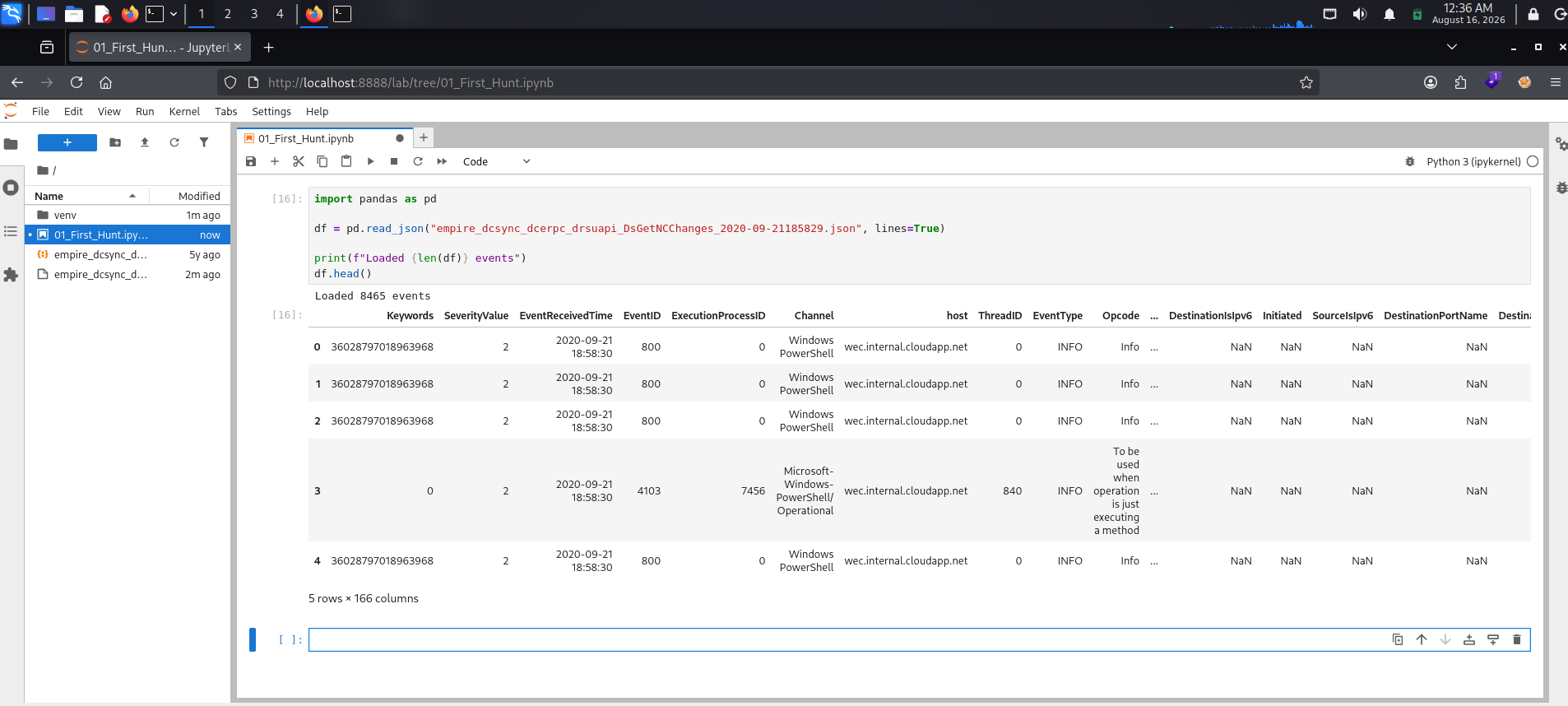
print(f"Loaded {len(df)} events") df.head() Refer Picture 1.
That pulled in 8,465 events with 166 columns which is quite normal when compared to corporare logs,
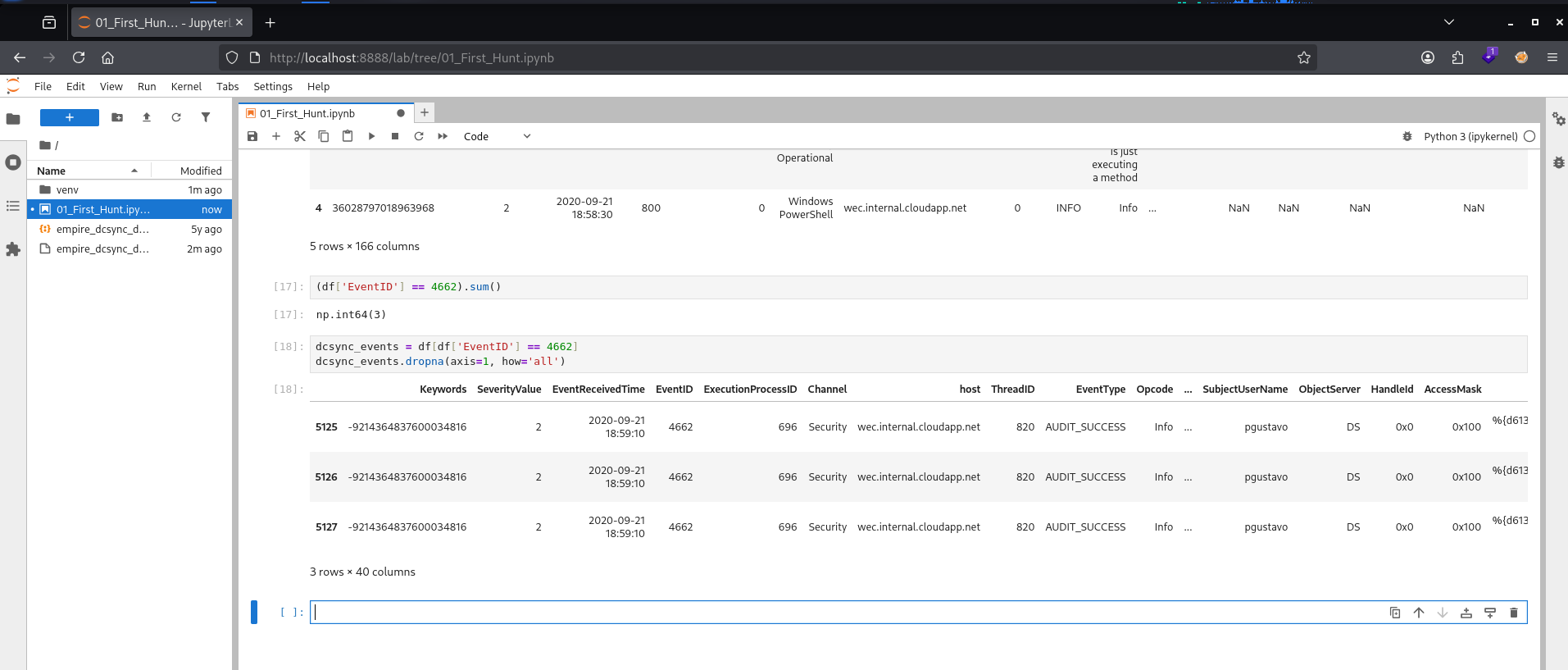
Before trying to find anything specific, I just wanted to see the shape of the data: (df['EventID'] == 4662).sum() three hits out of 8465 events refer picture 2.
I pulled just those rows and cleaned up the view by dropping any columns that were completely empty for them (with 166 columns, most don't apply to this event type):
dcsync_events = df[df['EventID'] == 4662] dcsync_events.dropna(axis=1, how='all') See Picture 2.
The account behind it was pgustavo — a regular named user, not a machine account, not a domain controller. That alone is a red flag, because this kind of replication request should really only ever come from an actual DC talking to another DC.
But "this looks weird" isn't enough on its own. I wanted the actual proof. Windows Event ID 4662 events carry a Properties field that lists the specific access rights being requested, and inside it were two GUIDs:
1131f6aa-9c07-11d1-f79f-00c04fc2dcd2 1131f6ad-9c07-11d1-f79f-00c04fc2dcd2
Those correspond to "DS-Replication-Get-Changes" and "DS-Replication-Get-Changes-All" — and having both requested together, by a non-DC account, is basically the fingerprint of DCSync. That's not a coincidence or a false positive pattern. That's the specific thing the attack does.
All three events happened at same time and same second which indicates a sync attack by the tool rather than a person doing it.
If you're trying to get into threat hunting and don't know where to start, this is genuinely the path I'd recommend: don't start with a SIEM, don't start with a certification course. Grab one labeled dataset for one technique, sit down in a notebook, and force yourself to find it manually. Once you've done that a few times, everything else — dashboards, saved searches, detection rules — is just a faster way of doing the exact same thing.
Thank You Sai Krishna Raman aka oraclehacker.